/EllipsoidH
| Command | |
| EllipsoidH Fills an elliptical area with a shell of blocks. | |
|---|---|
| Aliases | /EH |
| Usage |
/EllipsoidH /EllipsoidH BlockType |
| Category | Building |
| Required permissions | Draw |
| Usable from console? | No |
| Introduced in | fCraft 0.506 |
Surrounds an elliptical area with a shell of blocks, leaving the inside untouched. After entering the command you need to mark 2 opposing corners of the area. You can do that either by clicking the blocks (building or deleting works), or using the /Mark command. The ellipsoid will then automatically shape and fit itself within the specified area, and cut out the inside of it. The results of /EllipsoidH can be undone using /Undo.
/EllipsoidH
- Surrounds the area with the block that you are currently holding.
/EllipsoidH BlockType
- This information only applies when command is used with the Normal brush.
- Surrounds the area with a given block type.
/EllipsoidH OutsideBlock InsideBlock
- This information only applies when command is used with the Normal brush.
- Surrounds the area with a given block type, and fills the inside with the second given block type.
Drawing the hollow ellipsoid
-
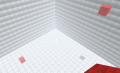 The marked area.
 -
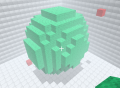 The completed shell.
 -
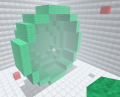 The completed shell with half cut away.


Customizing /EllipsoidHollow behavior
- The volume of blocks that can be drawn at once can be limited per-rank. See "Draw limit" field on ConfigGUI's Ranks tab. If you are editing
config.xmlmanually, set the "drawLimit" attribute on the<Rank>tag. - Being able to undo a command requires storing a backup of an area of the map. This may take up significant amounts of memory. By default, fCraft limits
/Undoto the first 2,000,000 blocks that are drawn. You can change this (or remove the limit entirely) via MaxUndo config key.