/Brush: Difference between revisions
Jump to navigation
Jump to search
No edit summary |
|||
| Line 27: | Line 27: | ||
Image:Checkered_c_red_cyan.png|<code>/c red cyan</code> | Image:Checkered_c_red_cyan.png|<code>/c red cyan</code> | ||
Image:Checkered cw obsidian lava.png|<code>/cw obsidian lava</code> | Image:Checkered cw obsidian lava.png|<code>/cw obsidian lava</code> | ||
Image:Checkered eh obsidian.png|<code>/eh obsidian</code> | Image:Checkered eh obsidian.png|<code>/eh obsidian</code> (with [jaggies http://en.wikipedia.org/wiki/Jaggies]) | ||
</gallery> | </gallery> | ||
=Rainbow Brush= | =Rainbow Brush= | ||
Revision as of 03:08, 15 October 2011
| Command | |
| Brush Changes the draw brush | |
|---|---|
| Usage |
/Brush /Brush BrushName [Params] |
| Category | Building |
| Required permissions | Draw DrawAdvanced |
| Usable from console? | No |
| Introduced in | fCraft 0.600 |
/Brush
- Shows the current draw brush.
/Brush BrushName [Params]
- Changes current draw brush to the given one. Optionally initializes brush with given parameters.
Checkered Brush
Checkered brush makes a checkerboard pattern. If two block names are given, alternates between those two. If one block name is given, this brush only draws every other block (leaving half of blocks untouched). If no block names are given, uses whatever block player was holding in their hand. Here are some examples of checkered brush use:
-
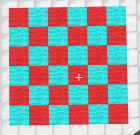
/c red cyan -
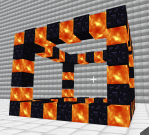
/cw obsidian lava -
![/eh obsidian (with [jaggies http://en.wikipedia.org/wiki/Jaggies])](/w/images/thumb/a/a9/Checkered_eh_obsidian.png/200px-Checkered_eh_obsidian.png)
/eh obsidian(with [jaggies http://en.wikipedia.org/wiki/Jaggies])


![/eh obsidian (with [jaggies http://en.wikipedia.org/wiki/Jaggies])](/wiki/File:Checkered_eh_obsidian.png)
Rainbow Brush
Rainbow brush is simple: it makes a rainbow pattern. It was originally made just as a test, but testers liked it. It takes no parameters. Here are some examples of checkered brush use:
-
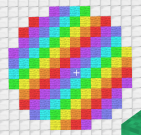
/e -
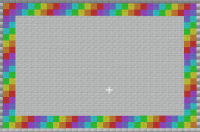
/c(as a picture frame) -
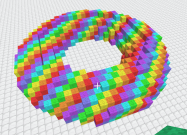
/torus


