/Brush: Difference between revisions
Jump to navigation
Jump to search
No edit summary |
No edit summary |
||
| Line 20: | Line 20: | ||
=Checkered Brush= | =Checkered Brush= | ||
Checkered brush makes a checkerboard pattern. If two block names are given, alternates | :Checkered brush makes a checkerboard pattern. | ||
If one block name is given, this brush only draws every other block (leaving half of blocks untouched). | :If two block names are given, brush alternates them. If one block name is given, this brush only draws every other block (leaving half of blocks untouched). | ||
<gallery widths=200px heights=135px perrow=3> | <gallery widths=200px heights=135px perrow=3> | ||
Image:Checkered_c_red_cyan.png|<code>/c red cyan</code> | Image:Checkered_c_red_cyan.png|<code>/c red cyan</code> | ||
| Line 30: | Line 30: | ||
=Rainbow Brush= | =Rainbow Brush= | ||
Rainbow brush is simple: it makes a rainbow pattern. It was originally made just as a test, but testers liked it. It takes no parameters. | :Rainbow brush is simple: it makes a rainbow pattern. It was originally made just as a test, but testers liked it. It takes no parameters. | ||
<gallery widths=200px heights=135px perrow=3> | <gallery widths=200px heights=135px perrow=3> | ||
Image:Rainbow_e.png|<code>/e</code> | Image:Rainbow_e.png|<code>/e</code> | ||
| Line 39: | Line 39: | ||
=Random Brush= | =Random Brush= | ||
Random brush makes a random pattern from one or more blocktypes. | :Random brush makes a random pattern from one or more blocktypes. | ||
:If two or more block names are given, each block has an equal chance to appear on the pattern (50/50 for two blocks, 33/33/33 for three, 25/25/25/25 for four, etc). If only one block name is given, this brush leaves half of blocks untouched. | |||
:For advanced use, you can specify percentage or ratio of each block in the mix. For example: <code>/brush random red/60 white/40</code> makes a pattern that's 60% red and 40% white blocks. Same thing can be accomplished by doing <code>/brush random red/3 white/2</code> (3 red blocks for every 2 white block). You can omit the number of ratio or percentage is 1 (writing <code>someBlock/1</code> is same as just <code>someBlock</code>). | |||
<gallery widths=200px heights=135px perrow=3> | <gallery widths=200px heights=135px perrow=3> | ||
Image:Random c yellow blue.png|<code>/c yellow blue</code> | Image:Random c yellow blue.png|<code>/c yellow blue</code> | ||
Revision as of 03:45, 15 October 2011
| Command | |
| Brush Changes the draw brush | |
|---|---|
| Usage |
/Brush /Brush BrushName [Params] |
| Category | Building |
| Required permissions | Draw DrawAdvanced |
| Usable from console? | No |
| Introduced in | fCraft 0.600 |
/Brush
- Shows the current draw brush.
/Brush BrushName [Params]
- Changes current draw brush to the given one. Optionally initializes brush with given parameters.
Checkered Brush
- Checkered brush makes a checkerboard pattern.
- If two block names are given, brush alternates them. If one block name is given, this brush only draws every other block (leaving half of blocks untouched).
-
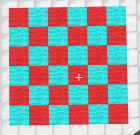
/c red cyan -
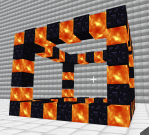
/cw obsidian lava -
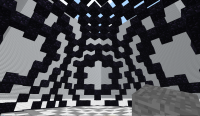
/eh obsidian(with moiré)


Rainbow Brush
- Rainbow brush is simple: it makes a rainbow pattern. It was originally made just as a test, but testers liked it. It takes no parameters.
-
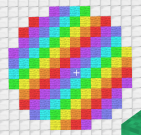
/e -
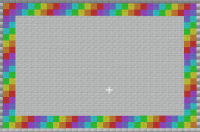
/c(as a picture frame) -
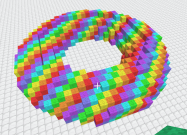
/torus


Random Brush
- Random brush makes a random pattern from one or more blocktypes.
- If two or more block names are given, each block has an equal chance to appear on the pattern (50/50 for two blocks, 33/33/33 for three, 25/25/25/25 for four, etc). If only one block name is given, this brush leaves half of blocks untouched.
- For advanced use, you can specify percentage or ratio of each block in the mix. For example:
/brush random red/60 white/40makes a pattern that's 60% red and 40% white blocks. Same thing can be accomplished by doing/brush random red/3 white/2(3 red blocks for every 2 white block). You can omit the number of ratio or percentage is 1 (writingsomeBlock/1is same as justsomeBlock).
-
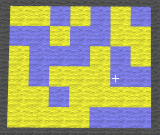
/c yellow blue -
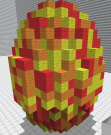
/e red orange yellow -
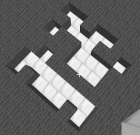
/c air -
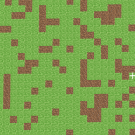
/c grass/75 dirt/25 -
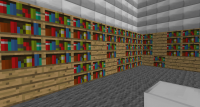
/c wood books/5 -
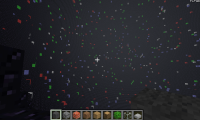
/eh obsidian/1000 white red blue green


