/Gen: Difference between revisions
Jump to navigation
Jump to search
No edit summary |
No edit summary |
||
| (8 intermediate revisions by 2 users not shown) | |||
| Line 9: | Line 9: | ||
|cat=World | |cat=World | ||
|aliases= | |aliases= | ||
|perm=ManageWorlds | |perm={{rperm|ManageWorlds}} | ||
|console=Yes | |console=Yes | ||
|v=0.200 | |v=0.200 | ||
|}} | |}} | ||
Generates a new map file. Can create many different kinds of terrain. The "theme" defines the appearance (type of blocks used): Arctic, Desert, Forest, Grass, Hell, Swamp. The "template" defines the shape of terrain: Archipelago, Atoll, Bay, Dunes (best with Desert theme), Flat, Hills, Ice (best with Arctic theme), Island, Lake, Mountains, Peninsula, Random (unpredictable), River, and Streams. | Generates a new map file. Can create many different kinds of terrain. The "theme" defines the appearance (type of blocks used): Arctic, Desert, Forest, Grass, Hell, Swamp. The "template" defines the shape of terrain: Archipelago, Atoll, Bay, Dunes (best with Desert theme), Flat, Hills, Ice (best with Arctic theme), Island, Lake, Mountains, Peninsula, Random (unpredictable), River, and Streams. Special "empty" and "ocean" templates do not need a theme specified. | ||
Since fCraft {{Changelog|0.610}}, the order of theme/template parameters can be swapped without problems. | |||
==<code>/Gen Theme Template</code>== | ==<code>/Gen Theme Template</code>== | ||
:Replaces the current world's map with a new one of the same size. | :Replaces the '''current world's map''' with a new one of the same size. | ||
==<code>/Gen Theme Template FileName</code>== | |||
:Creates a new map file of the same size as your current world's map. | |||
==<code>/Gen Theme Template Width Length Height</code>== | ==<code>/Gen Theme Template Width Length Height</code>== | ||
:Replaces the current world's map with a new one of given dimensions. | :Replaces the '''current world's map''' with a new one of given dimensions. | ||
==<code>/Gen Theme Template Width Length Height FileName</code>== | ==<code>/Gen Theme Template Width Length Height FileName</code>== | ||
:Creates a new map file with the given terrain type and dimensions. You can then load the new map by calling | :Creates a new map file with the given terrain type and dimensions. You can then load the new map by calling {{cmd|WLoad}} | ||
==Map Dimensions== | ==Map Dimensions== | ||
*'''Minecraft client works best if each map dimensions is either 16, 32, 64, 128, 256, 512, or 1024.''' Various problems can occur if map does not conform to this rule: | |||
**If any dimension is not a multiple of 16 (e.g. 16, 32, 48, 64, etc), there will be invisible blocks and a LOT of visual glitches. | |||
**If width or length (horizontal dimensions) are multiples of 16 but not powers of 2 (e.g. not 16, 32, 64, 128, 256, etc), there will be inaccessible walled-off areas on a map, and it will lag pretty badly. However, you can still make map height any multiple of 16 without negative side effects. | |||
**If any dimension is over 1024 blocks, players will become invisible when they pass the 1024 block mark. | |||
*Everywhere in fCraft commands, coordinates are given in "X Y Z" format (X/Y horizontal, and Z vertical). Similarly, map dimensions are given in "Width Length Height" format (Width/Length horizontal, and Height vertical). | |||
*The total size of the map is theoretically limited to 2147483647 blocks (2<sup>31</sup>-1). | |||
==Theme guide== | ==Theme guide== | ||
| Line 60: | Line 65: | ||
</gallery> | </gallery> | ||
{{LastUpdated| | {{LastUpdated|1650}} | ||
Latest revision as of 02:19, 24 July 2013
| Command | |
| Gen Generates a new map file. | |
|---|---|
| Usage |
/Gen Theme Template /Gen Theme Template Width Length Height /Gen Theme Template Width Length Height FileName |
| Category | World |
| Required permissions | ManageWorlds |
| Usable from console? | Yes |
| Introduced in | fCraft 0.200 |
Generates a new map file. Can create many different kinds of terrain. The "theme" defines the appearance (type of blocks used): Arctic, Desert, Forest, Grass, Hell, Swamp. The "template" defines the shape of terrain: Archipelago, Atoll, Bay, Dunes (best with Desert theme), Flat, Hills, Ice (best with Arctic theme), Island, Lake, Mountains, Peninsula, Random (unpredictable), River, and Streams. Special "empty" and "ocean" templates do not need a theme specified.
Since fCraft 0.610, the order of theme/template parameters can be swapped without problems.
/Gen Theme Template
- Replaces the current world's map with a new one of the same size.
/Gen Theme Template FileName
- Creates a new map file of the same size as your current world's map.
/Gen Theme Template Width Length Height
- Replaces the current world's map with a new one of given dimensions.
/Gen Theme Template Width Length Height FileName
- Creates a new map file with the given terrain type and dimensions. You can then load the new map by calling
/WLoad
Map Dimensions
- Minecraft client works best if each map dimensions is either 16, 32, 64, 128, 256, 512, or 1024. Various problems can occur if map does not conform to this rule:
- If any dimension is not a multiple of 16 (e.g. 16, 32, 48, 64, etc), there will be invisible blocks and a LOT of visual glitches.
- If width or length (horizontal dimensions) are multiples of 16 but not powers of 2 (e.g. not 16, 32, 64, 128, 256, etc), there will be inaccessible walled-off areas on a map, and it will lag pretty badly. However, you can still make map height any multiple of 16 without negative side effects.
- If any dimension is over 1024 blocks, players will become invisible when they pass the 1024 block mark.
- Everywhere in fCraft commands, coordinates are given in "X Y Z" format (X/Y horizontal, and Z vertical). Similarly, map dimensions are given in "Width Length Height" format (Width/Length horizontal, and Height vertical).
- The total size of the map is theoretically limited to 2147483647 blocks (231-1).
Theme guide
-
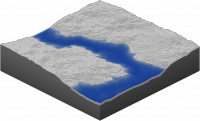
Arctic theme -
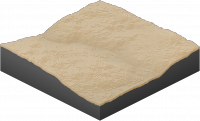
Desert theme -
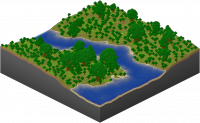
Forest theme -
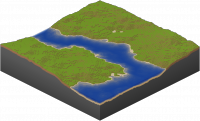
Grass theme -
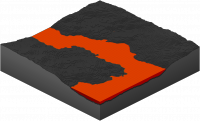
Hell theme -
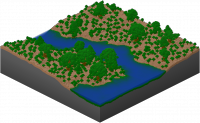
Swamp theme


Template guide
-
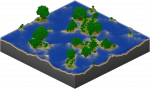
Archipelago -
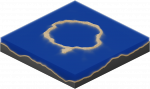
Atoll -
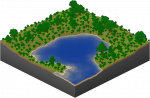
Bay -
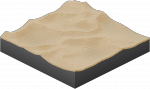
Dunes -
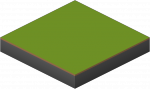
Flat -
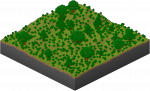
Hills -
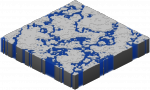
Ice -
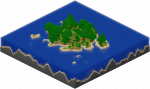
Island -
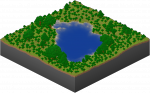
Lake -
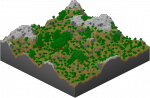
Mountains -
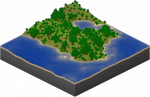
Peninsula -
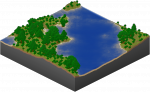
Random -
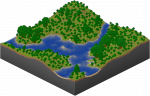
River -
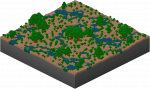
Streams


